GTO Wizard AI
 PokerTracker 4
 Hand2Note
 DriveHUD
 Jurojin

- ✓Interactive Reports & Graphs
- ✓Drag & Drop HUD Profile Editor
- ✓Global Database Tracking
Online Poker Database Management
PokerTracker 4 (PT4) is one of the main database management tools used by the online poker community. While new, flashy web-based tools hit the market every year, PT4 has remained the workhorse that the majority of professional grinders and serious amateurs use to track their progress since 2012. Technically, you can play online poker without a tracker. However, in the modern 2026 landscape, playing without a database is like trying to navigate a dark room without a flashlight.
How PokerTracker 4 Actually Works
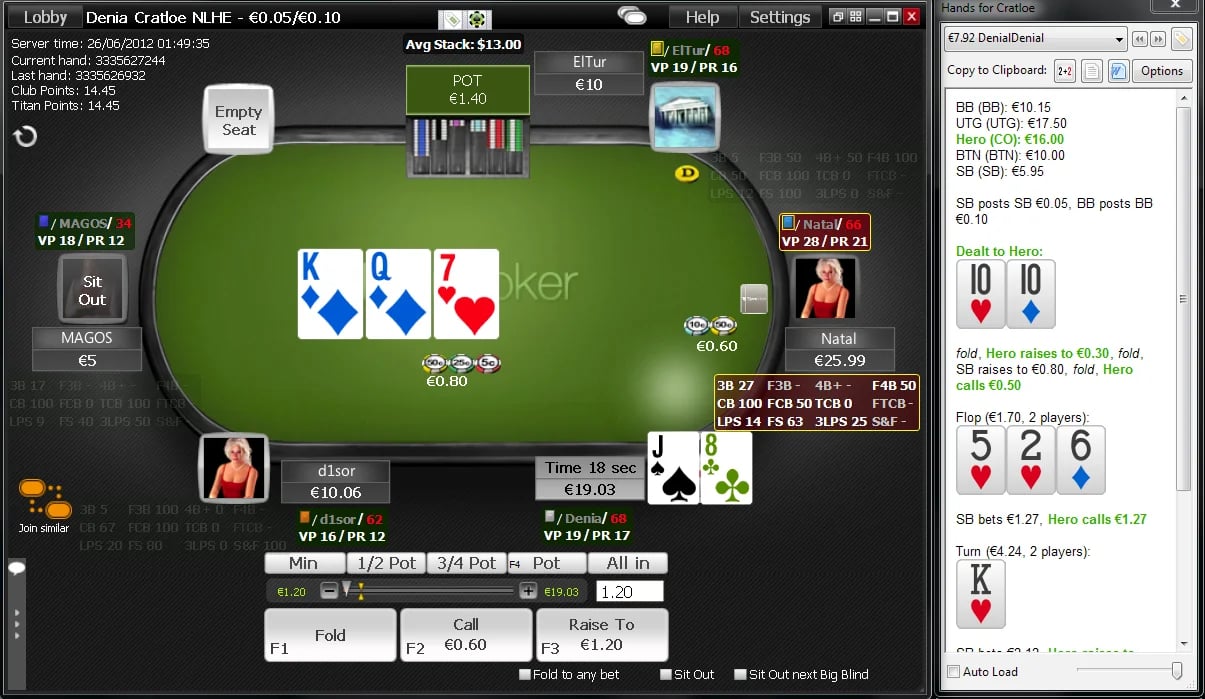
Since many online poker sites don't provide any form of historical data of your opponents' tendencies, PT4 fills that void by acting as a sophisticated data harvester. Essentially how it works is the software monitors the "Hand History" folders on your computer where the poker site saves text files of every hand played. PT4 reads these files in real-time, converts the text into statistics, and stores them in a local database.
Under the model where you are using PT4 during a live session, it would work something like this:
- The Data Collection: You play a hand on a site like PokerStars or 888. The site saves a text file of that hand to your hard drive.
- The Processing: PT4 "scrapes" that file the moment it’s saved and identifies that "Player_A" just 3-bet from the Small Blind for the 4th time in 20 hands.
- The Overlay (HUD): PT4 then projects a small transparent box- the Heads-Up Display- directly onto your poker table next to Player_A, updating their "3-bet frequency" to 20%.
- The Edge: When the action folds to you, you see that 20% stat and realize they are over-bluffing, allowing you to make a mathematically informed 4-bet.
Key Features & Functionality
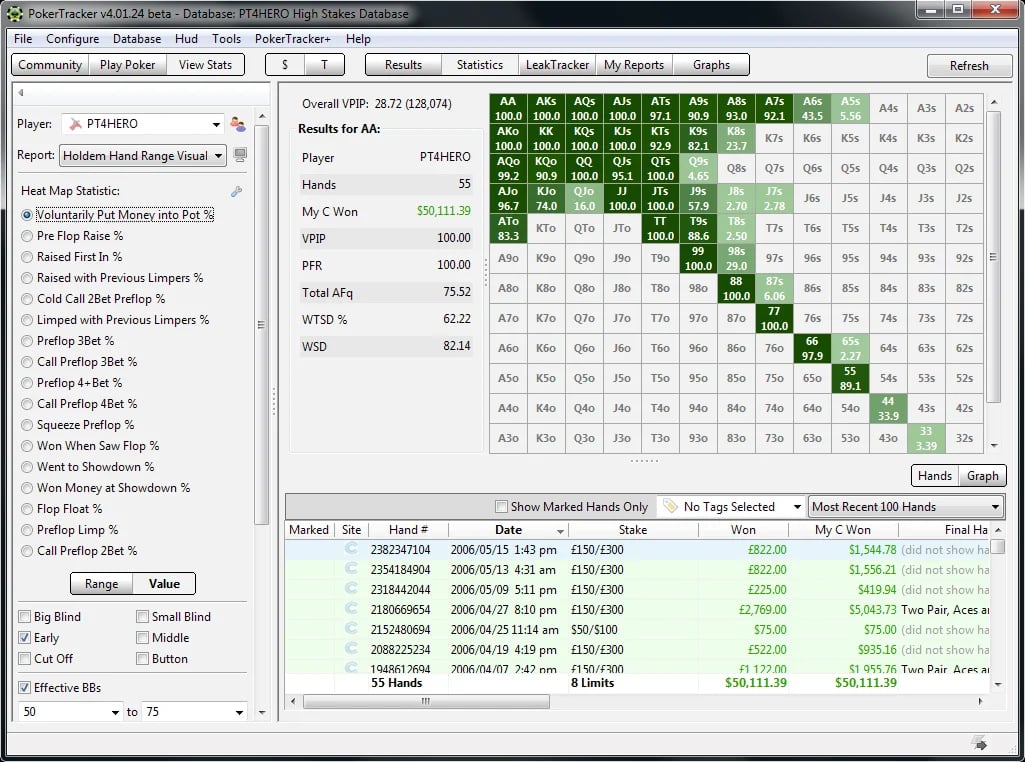
PT4 isn't just a live overlay; it’s a massive post-game analysis suite. Historically, players have used it to "plug leaks"- identifying specific situations where they are losing money over the long term.
The HUD (Heads-Up Display): This is the primary in-game tool. It is fully customizable, meaning you can track everything from how often someone folds to a continuation bet to how often they check-raise the turn.
LeakTracker: This feature compares your personal statistics against a database of "winning" players. If you are folding too much on the river or not defending your Big Blind enough, LeakTracker will highlight these outliers in red.
NoteTracker: Instead of manually typing notes like "bluffs with missed draws," NoteTracker automatically creates shorthand notes based on actual hand histories it has recorded.
Equity Calculator: Built directly into the software, this allows you to run "what-if" scenarios to see your mathematical win percentage against an opponent's specific range of cards.
Pricing & Versions
PokerTracker 4 uses a "one-time purchase" model rather than the monthly subscriptions that are becoming standard elsewhere. This makes it much more cost-effective for the long-term player.
Small Stakes Version ($64.99): Covers Hold'em or Omaha up to .25/.50 No Limit and $22 buy-in tournaments.
Full Version ($99.99): Covers all stakes with no limitations.
Small Stakes Combo ($99.99): Covers both Hold'em and Omaha for small stakes.
Supported Poker Sites & Networks

PokerTracker 4 is incredibly powerful, but the way it operates relies entirely on one crucial factor: the poker site actually providing downloadable hand histories. For operators, the decision to allow tracking software or ban it is differs from site to site. While PT4 wants to support every room on the internet, the reality is that its compatibility is tethered strictly to the Terms of Service of each individual poker network.
Here is how the current landscape of supported sites generally breaks down for PT4:
Natively Supported Networks:
- PokerStars: The industry standard; fully supported with no extra steps.
- 888poker & iPoker Network: Fully supported, though some specific fast-fold tables (like anonymous "Snap" games) will restrict the HUD to session-only stats to comply with operator rules.
- Winning Poker Network (WPN): All sites on this network are fully integrated.
- Winamax & Merge Network: Seamlessly supported for both cash games and tournaments.
Strictly Unsupported Networks
- GGPoker / PartyPoker / WPT Global: They have completely banned all third-party tracking software. They offer their own built-in, rudimentary "SmartHUD," but PT4 will not function on their client.
- Unibet: No trackers or third-party HUDs allowed, period.
- Sweepstakes Poker (Clubs Poker, etc.): Because these sites operate entirely within a web browser using the sweepstakes model, they do not output standard text hand histories to your hard drive. PT4 natively does not support them without the use of highly specialized, often frowned-upon third-party card catchers.
The Use Case: Who is this for?
If you are a resident playing a $5 tournament once a month, you probably don't need PT4. The learning curve is steep, and the setup requires a bit of technical "under the hood" work with PostgreSQL databases.
However, if you are playing more than two tables at a time, or if you are serious about moving up in stakes, it becomes a necessity. PT4 is diligent about staying "white-listed" on major sites, meaning using it won't get your account in trouble for "cheating" as long as the site permits HUDs.
The state of the game in 2026 is one of information. PokerTracker 4 provides the most reliable aggregation of that information available. Is it the prettiest software on the market? No- the interface feels a bit like using Excel from 2015. But is it one of the most powerful tools for building a long-term winning database? Absolutely.
The decision whether to invest the time into learning PT4 is a choice you have to make for yourself based on your goals, but for anyone looking to transition from a "gambler" to a "player," this is the first place we recommend starting.